R Script · Downstream 16S Analysis · From OTUs to Figures in minutes

16S Structured R Workflow and Complete 16S Pipeline for Microbiome Analysis

Get a ready-to-use 16S R code workflow and complete 16S pipeline for NGS meta-barcoding data downstream analysis and visualization in R. The script generates analysis-ready figures, exported CSV files, and a Methods section for microbiome projects.

Instant download. Individual license. No subscription.

Analysis frameworkfully commented R code
13analysis sections
33+figures produced
5CSV exports
QZA + CSVboth formats
Microbiome workflow running in RStudio

What this script actually does

Read the 🔬 Microbiome R Workflow Visual Field Guide

This is a downstream analysis tool. It does not perform sequencing, denoising, or DADA2 processing. It starts where QIIME2 ends — with your preprocessed feature table — and runs the statistical analyses you need to interpret your data and write your Methods section.

✓ Good fit if:

You have processed 16S data (OTU/ASV table + taxonomy + metadata) from QIIME2, DADA2, or similar. You work in R. You want alpha diversity, beta diversity, differential abundance, and correlation analyses with analysis-ready ggplot figures and FDR-corrected statistics.

⚠ Not the right tool if:

You need raw sequence fastq processing (DADA2, denoising, OTU picking).

📥

Two input formats

Import directly from QIIME2 .qza artifacts (recommended) or from plain CSV/TSV tables if you have already exported your data.

⚙️

Three variables to configure

Set your working directory path, your sample ID column, and your grouping variable. Everything else in the script derives from those three values.

▶️

Run section by section

13 labeled sections in RStudio. From taxonomic profiling to alpha/beta diversity, to differential abundance. Run them sequentially and start exploring your dataset and gaining biological insights in minutes.

What the script produces

Running all 13 sections generates the following outputs. The exact figure count varies slightly depending on your number of groups and whether a phylogenetic tree is available.

20+ Analysis-ready figures

  • Read depth and rarefaction curves — know your data before you analyze it
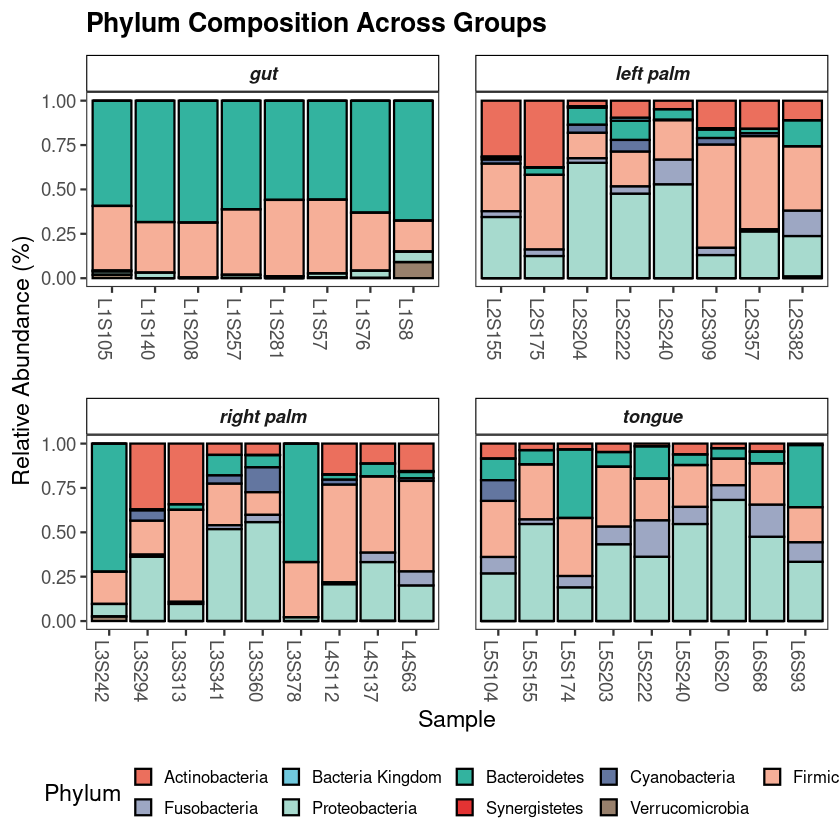
  • Phylum composition charts by group
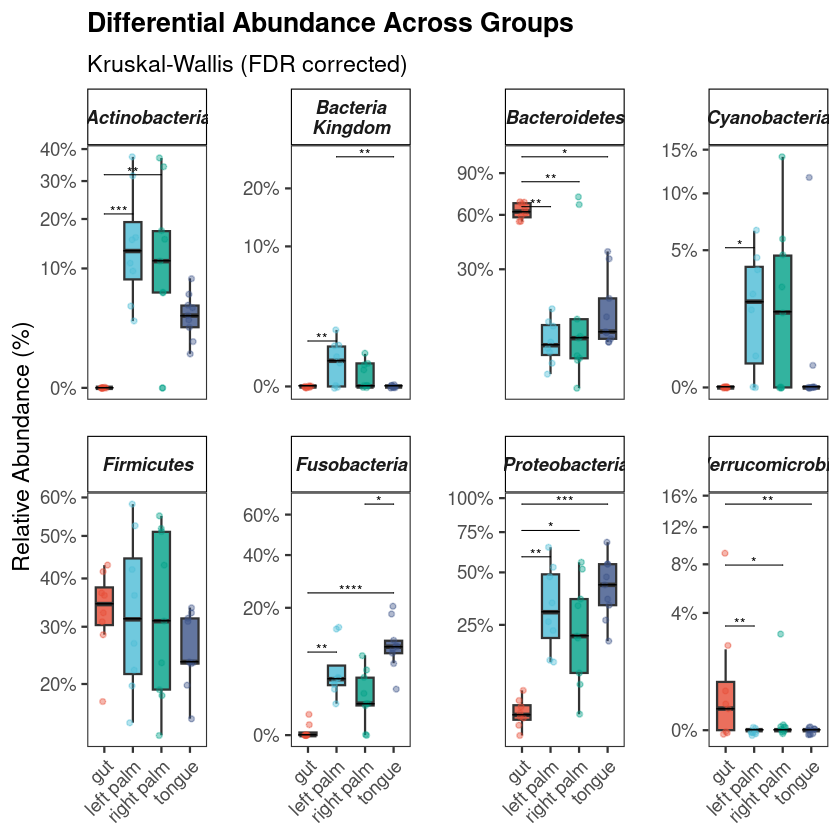
  • Top phyla and genera boxplots with automatic significance stars
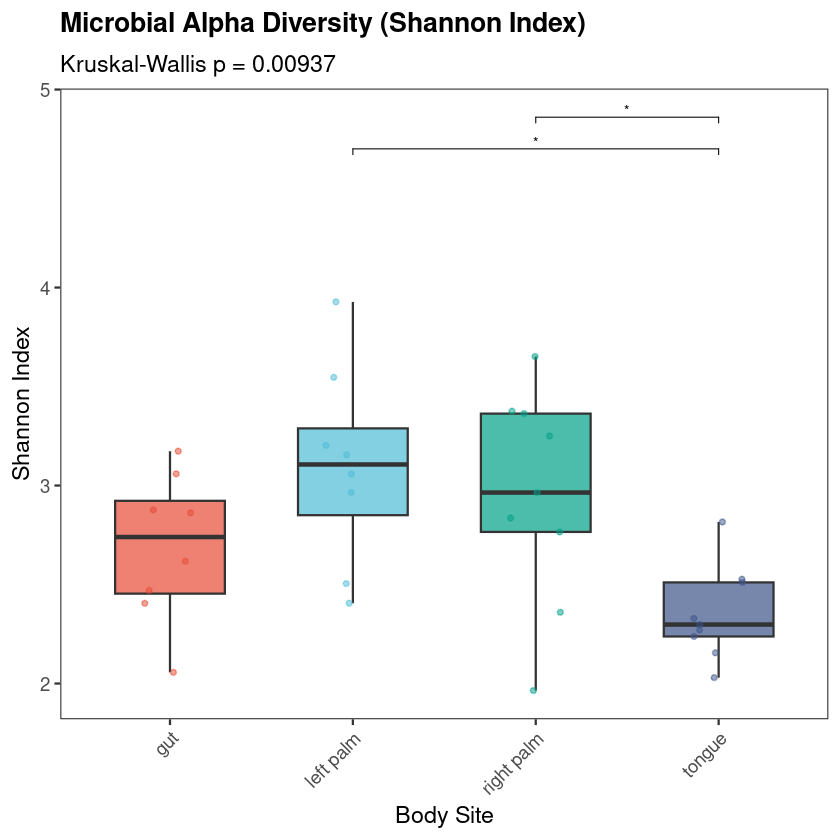
  • Alpha diversity metrcis (Shannon, Observed) with pairwise statistics
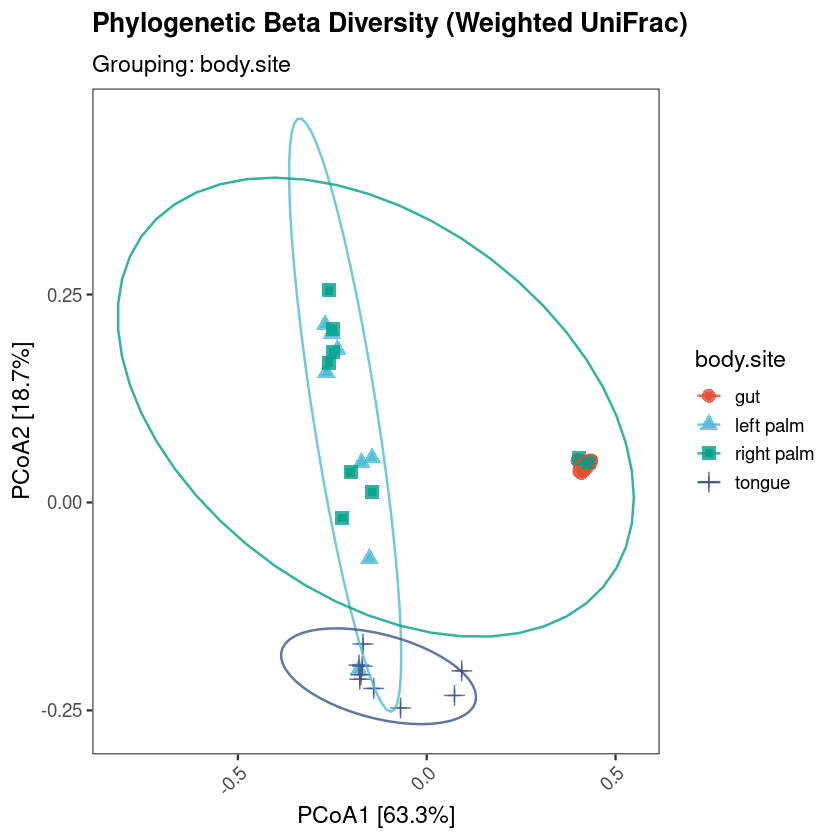
  • Beta diversity ordination (NMDS + PCoA) with group ellipses
  • Differential abundance plots for the most informative genera
  • Logistic regression forest plot (odds ratios + 95% CI)
  • ROC curve with AUC on a held-out test set
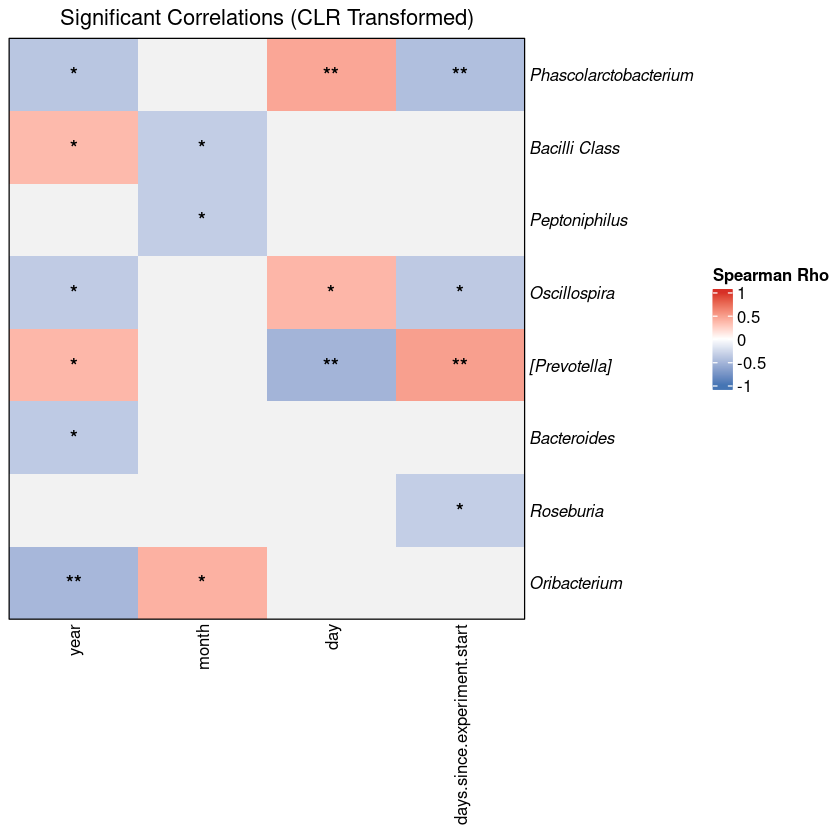
  • Taxa–metadata correlation heatmap

5 ready-to-submit CSV tables

  • Phylum abundance by group
  • PERMANOVA results (Bray-Curtis, Jaccard)
  • PERMANOVA results (Weighted UniFrac)
  • Dunn post-hoc pairwise comparisons
  • Significant taxa–metadata correlations (FDR corrected)

8 statistical tests, automatically applied

  • Kruskal-Wallis + Dunn post-hoc with FDR correction
  • PERMANOVA (999 permutations) + dispersion check
  • Wilcoxon or Kruskal-Wallis — selected automatically by group count
  • Univariate logistic regression per genus
  • ROC / AUC with stratified train/test split
  • Spearman correlation with global FDR

Methods section, ready to paste

  • Statistical Methods paragraph — edit two lines and paste into your manuscript
  • Full software citations with package names and DOIs

The 13 analysis sections

Each section is clearly labeled in the script. Run them in order in RStudio. The rarefied phyloseq object built in Section 2 is used by all downstream sections, so do not skip it.

0

Installation & libraries

Auto-installs missing packages from CRAN, Bioconductor, GitHub. Run once.

C

Configuration & import

Set 3 variables. Choose QZA auto, QZA manual fallback, or CSV import.

1

QC & phyloseq object

Taxonomy cleaning, prevalence filter (5%), read depth histogram.

2

Rarefaction

Rarefaction curves, depth selection at 90% of minimum, rarefied object.

3

Phylum composition

Stacked bar chart + boxplots for top 8 phyla by group.

4

Top phyla distribution

Top 4 phyla with auto-switching Wilcoxon / Kruskal-Wallis significance stars.

5

Top genera distribution

Top 4 genera with significance annotations and prefix cleaning.

6

Taxa overview

Dominant taxa, group-level abundances, fast Spearman correlation preview.

7

Alpha diversity

Shannon + Observed, Kruskal-Wallis global test, Dunn post-hoc with FDR.

8

Beta diversity — NMDS

Jaccard NMDS, PERMANOVA (999 permutations), betadisper, taxa loadings plot.

9

PERMANOVA detail

Full PERMANOVA output table, betadisper visualization, TukeyHSD if needed.

10

UniFrac & PCoA

Weighted UniFrac, PCoA with % variance explained. Requires phylogenetic tree.

11

Differential abundance

Per-genus Wilcoxon or Kruskal-Wallis, Dunn post-hoc, FDR correction, forest plot.

12

Logistic regression + ROC

Univariate models per genus, odds ratios + CI, train/test ROC curve, AUC.

13

Integrative correlations

CLR transform, Spearman × numeric metadata, global FDR, ComplexHeatmap.

Sections are sequential

Each section uses objects from the previous one. Run in order, check output, proceed.

microbiome-phyloseq-workflow.r — Configuration section (the only part you edit)
# ── The 3 variables to set before running ─────────────────────────────────

MY_WORKING_DIR <- "path/to/your/project/folder"
MY_SAMPLE_ID   <- "sample_name"   # column identifying each sample
MY_GROUP_VAR   <- "Treatment"     # your grouping column

# ── Then choose ONE import option ─────────────────────────────────────────

# Option 1 (recommended): QIIME2 .qza artifacts
QZA_TABLE    <- "table.qza"
QZA_TREE     <- "rooted-tree.qza"
QZA_TAX      <- "taxonomy.qza"
QZA_METADATA <- "metadata.tsv"

# Option 3: plain CSV tables (no tree → UniFrac section is skipped)
CSV_OTU      <- "your_ASV_table.csv"
CSV_TAX      <- "your_taxonomy.csv"
CSV_METADATA <- "your_metadata.csv"

What you need to run it

Package installation is handled by the script on first run. You need R, an internet connection for that first run, and your preprocessed data.

System requirements

R ≥ 4.2 Download from cran.r-project.org. Older versions may have compatibility issues with Bioconductor packages.
RStudio — recommended Not required, but the section-by-section structure is designed for RStudio's code execution workflow.
Internet — first run only Section 1 installs 20 packages from CRAN, Bioconductor, and GitHub. Takes 15–30 minutes on a clean R installation.
Your preprocessed 16S data Feature table + taxonomy + metadata. Either as QIIME2 .qza files or exported CSV/TSV tables.

Files in the download

Direct link with immediate access after purchase.

microbiome-phyloseq-workflow.r
The R script — fully commented, educational, 13 sections
Statistical_Methods_Summary.txt
Paste-ready Methods section text
Statistical_Software_and_Bioinformatics_Packages.txt
Software citations with package names and DOIs
microbiome_workflow.pdf
Software citations with package names and DOIs
README.txt
Setup instructions, known limitations, usage guide
License.txt
Individual license terms

Get access

Launch pricing — 50% off

Individual License

For one researcher

$79.00 $39.50
One-time purchase · Instant download
  • The full R script — 2,190+ lines, 13 sections
  • Reference guide PDF
  • Methods text + software citations
  • README with validation dataset links
  • Single user · personal research use
Get instant access — $39.50
All sales are final. Digital product — immediate access on purchase.
Lab License — up to 5 users

Lab License

For a research group or lab

$199.00 $99.50
One-time purchase · Instant download · Launch pricing
  • Everything in the Individual License
  • Up to 5 users in the same research group or lab
  • Shared use within a single PI's group
  • Each user gets their own download access
  • Does not cover redistribution outside the group
Get Lab License — $99.50
All sales are final. Digital product — immediate access on purchase.

FAQ

Do I need raw sequencing files to use this?

No. This script starts after preprocessing. You need a feature table (OTU/ASV), taxonomy assignments, and sample metadata. Raw reads, DADA2, and denoising are not involved.

How do I install the required packages?

Run Section 1 of the script. It checks for each package and installs only the ones that are missing, from CRAN, Bioconductor, and GitHub. You do not need to install anything manually first.

What if qiime2R fails to install?

Use Option 2 (manual QZA import) or Option 3 (CSV import) instead. Both are included in the script. Option 3 does not require qiime2R at all and works with plain CSV tables exported from any preprocessing tool.

Can I use this with my own data?

Yes. Set MY_WORKING_DIR, MY_SAMPLE_ID, and MY_GROUP_VAR to match your project, then point the import section to your own files. The rest of the script runs on whatever phyloseq object is built from your data. Not every section will produce output for every dataset — for example, the correlation heatmap requires numeric metadata columns.

What does the individual license allow?

One person per purchase. You can use the script for your own research, adapt it for your own datasets, and cite it in your Methods section. You cannot share, redistribute, or republish the script — including in courses, tutorials, or shared lab repositories. Each user needs their own license.

Do I need to know R well to use this?

Basic R familiarity is needed — you should be able to run code blocks, read error messages, and change variable values. The script is commented throughout, but it is a real analytical script, not a step-by-step tutorial. If you are new to R, expect to spend time on the initial setup.

Are refunds available?

No. The download is available immediately after purchase. Please read this page carefully and make sure the script matches your use case before buying.

A structured starting point for 16S downstream analysis

Run it on your own dataset. Save days of coding & start gaining biological insights in minutes

Get access — $39.50 Read the full description ↑
16S Microbiome R Workflow Get access $79 $39.50

Contact

Questions about your order?

Reach out via our Contact Form. We're here to help.